

Most job seekers in India don't know that Google has two separate tools for job alerts and they work very differently. One is built into Google Search itself. The other is a general-purpose web monitoring tool that job seekers have adapted for job hunting. Both are free, both are useful up to a point, and both have specific limitations that matter if you are looking for startup and SMB roles in India specifically.
This guide covers how to set up job alerts using both Google tools, what each one does well, where each one falls short, and what to use alongside them for the best coverage of India's startup job market.
The fastest way to get startup job alerts in India: HuntYourTribe indexes jobs directly from 300+ startup and SMB career pages across India and delivers free email alerts filtered by city and role no setup complexity, no noise from staffing agencies or large MNCs. 👉 Set up your free job alert →
The Difference Between Google for Jobs and Google Alerts
Before setting anything up, it helps to understand what these two tools actually are because most guides treat them as the same thing, which they are not.
Google for Jobs is a job search feature built directly into Google Search. When you search for job-related queries on Google, a panel of job listings appears at the top of the results page these are pulled from LinkedIn, Naukri, Indeed, Glassdoor, and company career pages that have added structured data markup. Google for Jobs has a built-in alert feature that lets you subscribe to email notifications for new listings matching your search.
Google Alerts is a completely separate tool at google.com/alerts. It monitors Google's search index for new web pages matching keywords you specify and sends email notifications. Job seekers use it to track when specific companies post new jobs on their career pages or when job-related keywords appear in new content indexed by Google.
Both tools are free. Both deliver alerts by email. But they track different things and work in different ways.
Part 1: How to Set Up Job Alerts on Google for Jobs
Google for Jobs is the simpler of the two tools and the one most relevant for general job seekers in India.
Step 1: Search for Jobs on Google
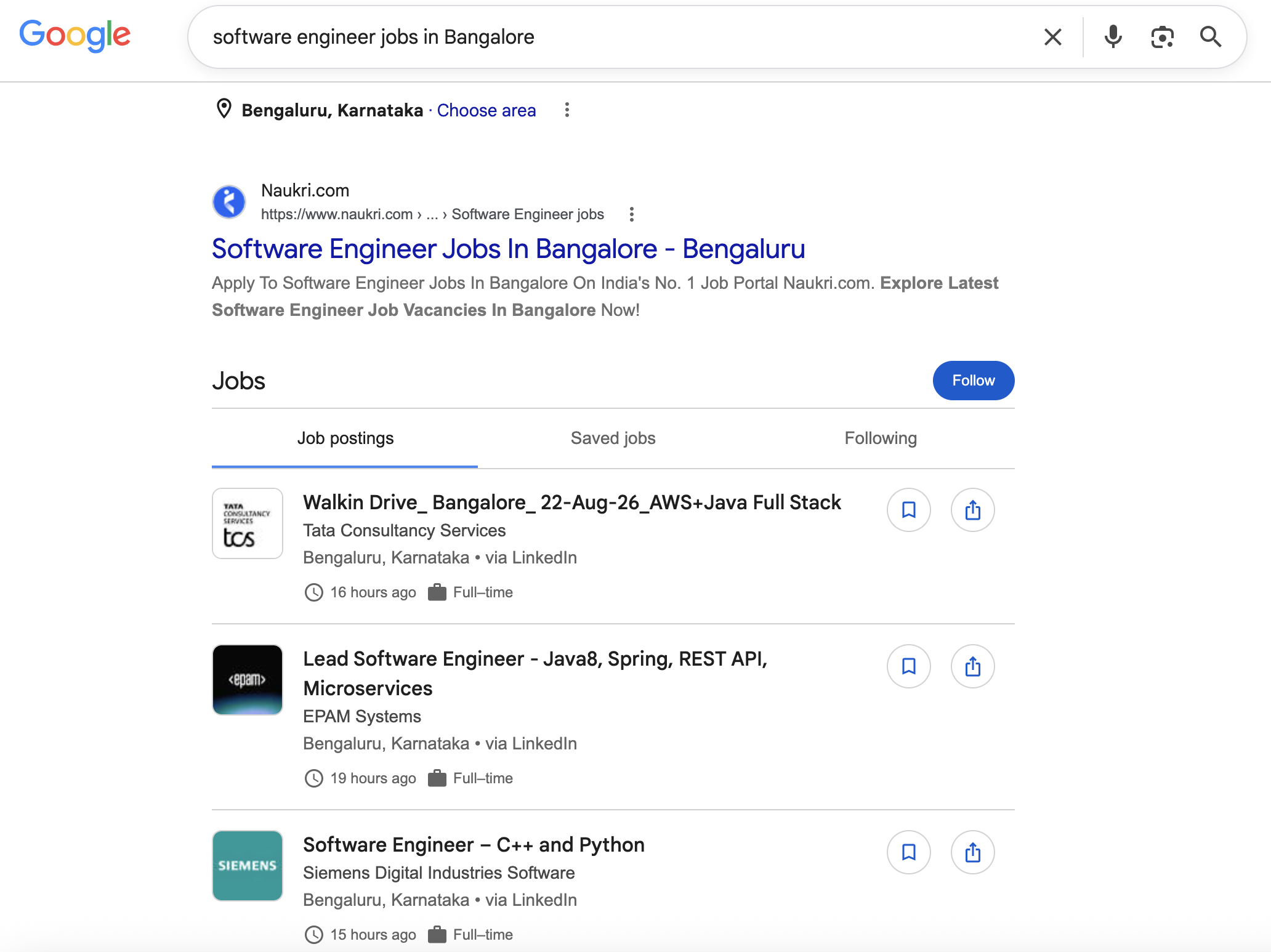
Open Google and search for the type of role and location you are looking for. Use natural language for example:
software engineer jobs in Bangaloreproduct manager jobs in Hyderabadmarketing jobs in Chennaidata analyst jobs in Pune
A panel of job listings will appear near the top of the search results page. This is Google for Jobs.
Step 2: Open the Google for Jobs Panel
Click on any listing in the panel or click "See all jobs" to open the full Google for Jobs interface. This opens a dedicated job search view with filters for date posted, job type, company, and location.
Step 3: Refine Your Search
Use the filters to narrow your results:
- Date posted: Set to "Past 24 hours" or "Past week" to surface the freshest listings
- Job type: Full-time, Part-time, Contractor, Internship
- Company type: Not available this is a significant limitation for startup job seekers
- Location: Specific city, remote, or within a set distance
Step 4: Create a Job Alert
Once your search is set up, look for the "Follow" button within the Google for Jobs interface. Click it and Google will prompt you to confirm your email address.
You will then receive email notifications when new jobs matching your search appear in Google's job listings index.
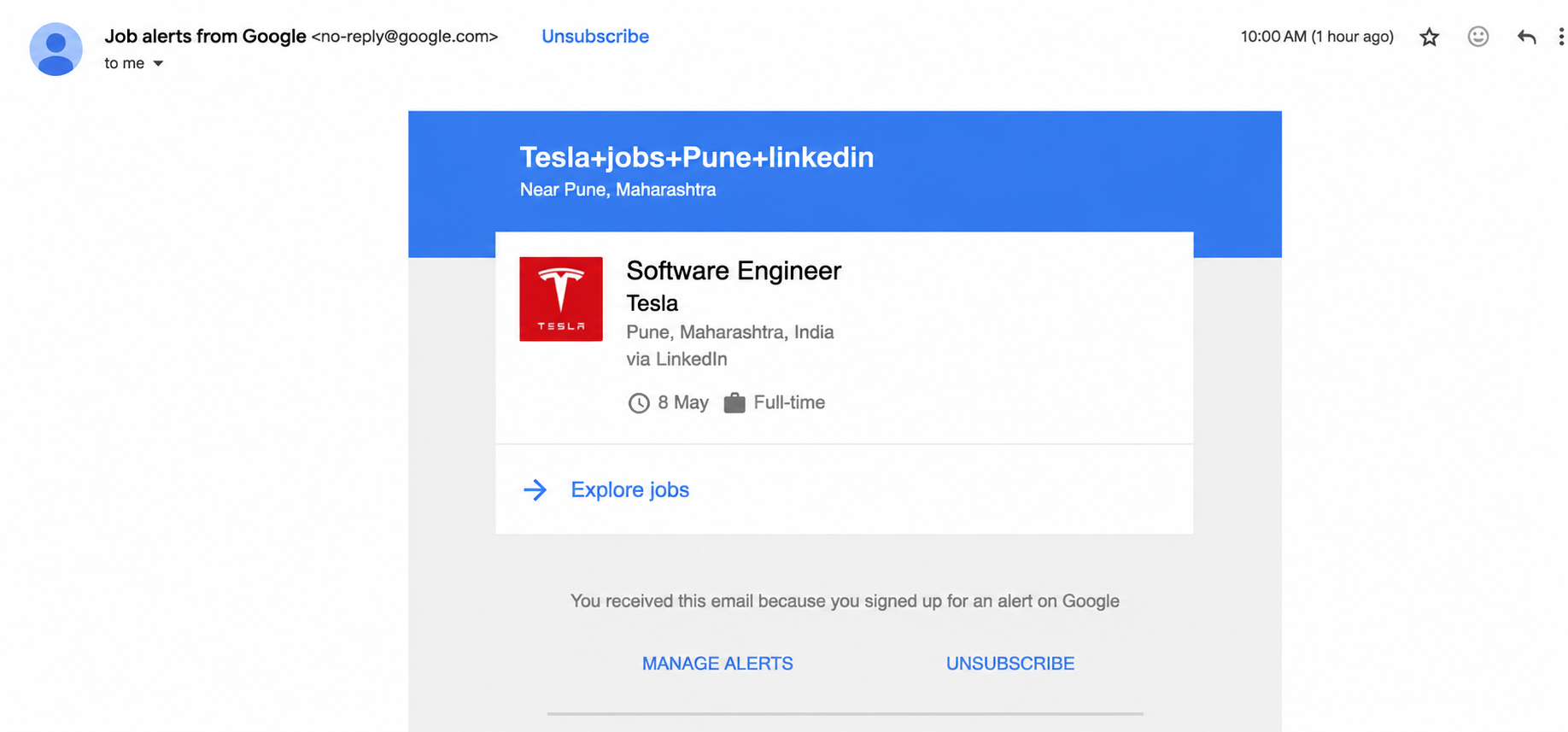
What Your Google for Jobs Alert Email Looks Like
The alert email contains a list of new job listings matching your search role title, company name, location, and a link to apply. The email is well-formatted and easy to scan.
Part 2: How to Set Up Google Alerts for Job Search
Google Alerts works differently from Google for Jobs. It monitors the entire web for new pages matching your keywords not just job listings. Job seekers use it as a way to track when specific company career pages update with new roles, or when job-related terms appear in newly indexed content.
Step 1: Go to google.com/alerts
Open google.com/alerts in your browser. You need to be signed into a Google account.
Step 2: Enter Your Search Query
Type the keyword or phrase you want to monitor. For job search, effective queries include:
To monitor a specific company's career page:
site:freshworks.com careers
site:razorpay.com jobs
site:darwinbox.com careers
To monitor jobs at startups on specific ATS platforms:
site:jobs.lever.co "product manager" Bangalore
site:boards.greenhouse.io "software engineer" India
To monitor job postings across all career pages:
"software engineer" (site:careers.* OR site:*/careers/*) "Chennai"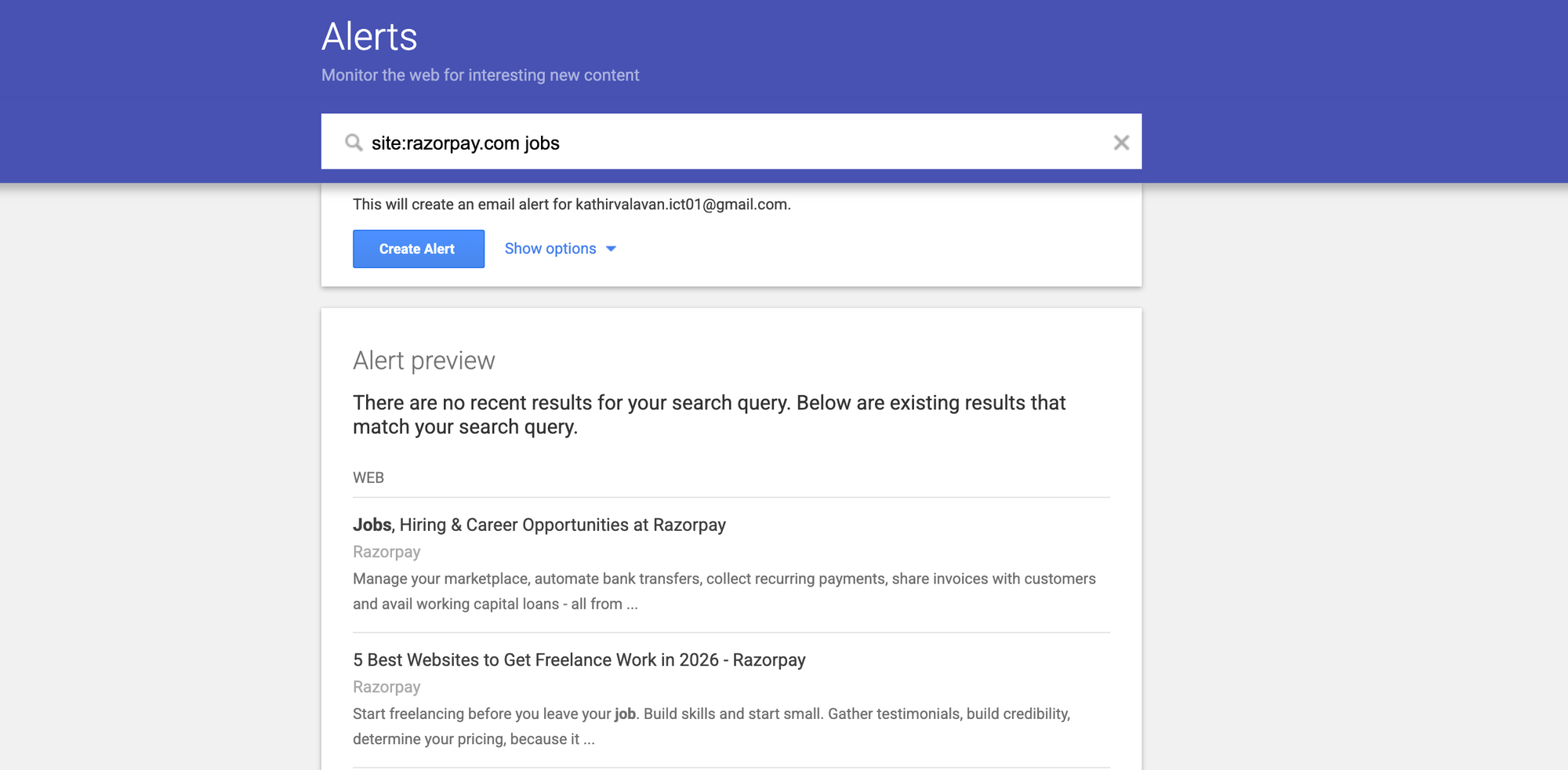
Step 3: Configure Alert Settings
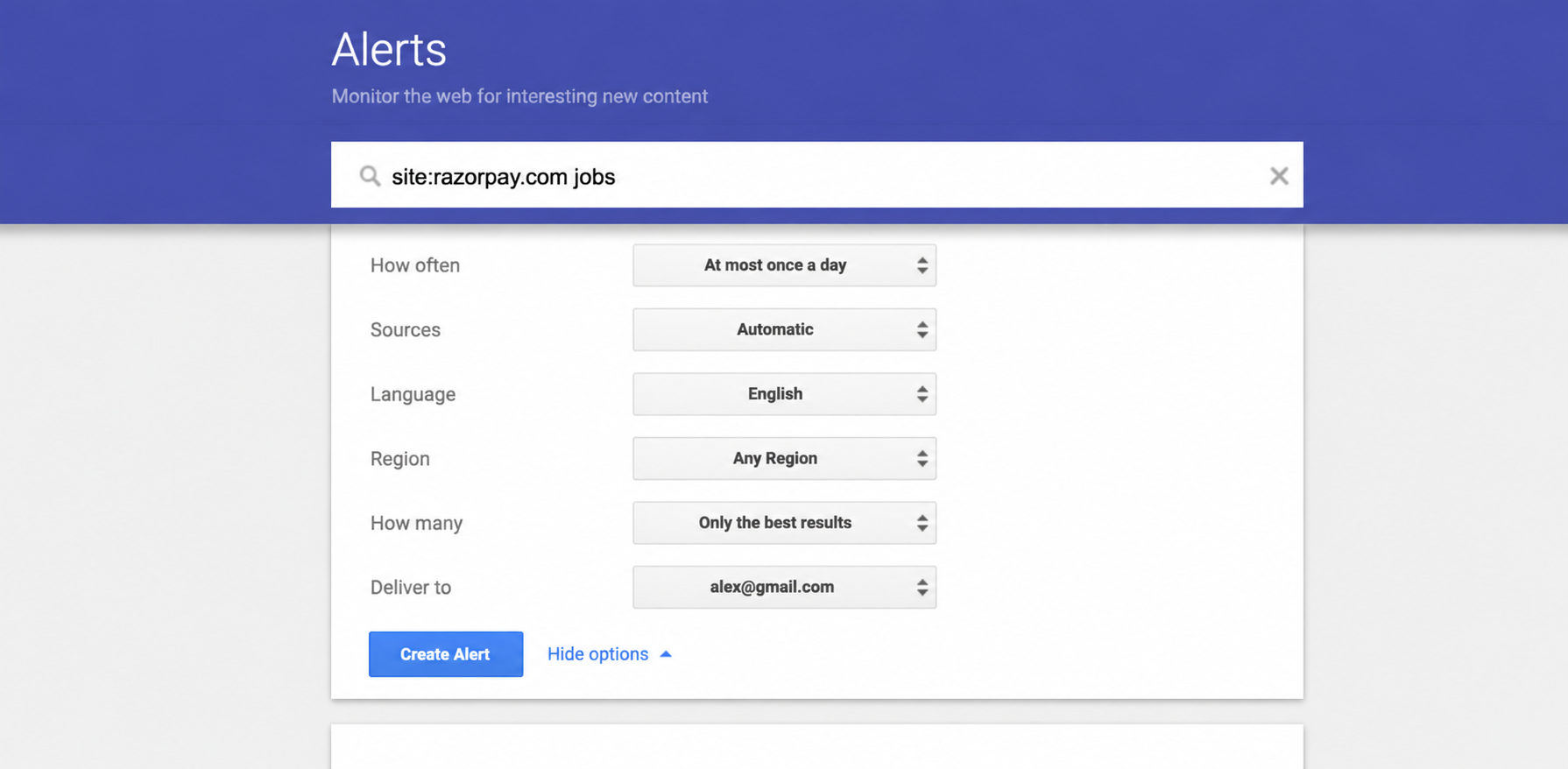
Click "Show options" to expand the settings:
- How often: As-it-happens for important alerts; once a day for broader monitoring
- Sources: Leave on Automatic
- Language: English
- Region: India
- How many: All results (to catch more listings)
- Deliver to: Your email
Step 4: Create the Alert
Click "Create Alert." Google will send you an email whenever new content matching your query is indexed. For job search queries this typically means a new job posting page has appeared in Google's index.
Where Google Job Alerts Fall Short for Startup Jobs in India
Both Google tools are useful, but each has specific limitations that matter for candidates targeting startups and SMBs in India.
Google for Jobs Limitations
No company-type filter. Google for Jobs does not let you filter by company type. Startup listings are mixed with MNC, IT services, and staffing agency postings in every search and every alert. A search for "software engineer jobs in Bangalore" returns roles from TCS, Wipro, and staffing agencies alongside startup roles with no way to separate them.
Not all startup jobs appear. Google for Jobs only shows roles from companies that have either posted on a platform it indexes (LinkedIn, Naukri, Indeed) or added JobPosting schema markup to their own career pages. Many Indian startups and SMBs do not have this markup, meaning their jobs never appear in Google for Jobs at all even when the role is live on their careers page.
Alert delay. Google for Jobs alerts depend on when Google re-indexes the relevant platforms. A role posted on a company's career page may take hours or days to appear in Google for Jobs, by which time other candidates have already applied.
Google Alerts Limitations
Technical setup required. Writing effective Google Alerts queries for job search requires knowledge of search operators. A basic query like software engineer jobs Bangalore will return news articles, blog posts, and other content alongside actual job listings generating significant noise.
Unstructured output. Google Alerts sends you a page URL and title. It does not extract job details role title, company name, location, experience level into a clean, scannable format. You have to click each link individually to see if the listing is relevant.
Coverage gaps. Google Alerts only catches content that Google's crawler has newly indexed. It does not detect changes to existing pages. If a company updates their careers page with new roles rather than publishing new URLs, Google Alerts may not send a notification at all.
HuntYourTribe vs Google Job Alerts
HuntYourTribe vs Google Job Alerts: Which Is Right for You?
| Google for Jobs Alert | Google Alerts | HuntYourTribe | |
|---|---|---|---|
| Startup-specific filter | No | No | Yes, startups and SMBs only |
| Alert format | Structured job listings | Raw page links | Structured job listings |
| Setup complexity | Simple | Requires search operators | Simple |
| Speed after posting | Hours to days | Hours to days | Within 4 hours company publishes |
| Company types | All, no filter | Depends on query | Startups, IT services, SMBs only |
| Staffing agency noise | Yes | Yes | No, excluded by default |
| India cities covered | All | All | Chennai, Bangalore, Hyderabad, Pune, Mumbai, Delhi NCR, Coimbatore, Madurai |
| SMB coverage (500-5k employees) | No filter | No filter | Yes |
| Cost | Free | Free | Both Free and Premium plans(real-time alerts) |
The Best Setup for Startup Job Seekers in India
Using Google tools and HuntYourTribe together gives the most complete coverage of India's startup job market.
Google for Jobs alerts work well for broad market monitoring roles at all company types across India, delivered in a clean format. Use them with the "Past 24 hours" date filter to surface the freshest listings.
Google Alerts work well for monitoring specific companies you want to work at. Set up alerts for individual company career pages (e.g. site:freshworks.com careers) so you know the moment they post something new.
HuntYourTribe email alerts cover what both Google tools miss startup and SMB roles that never appear on generic job boards, indexed directly from company career pages, delivered filtered by city and role with no staffing agency noise.
Set up all three once and your job search runs on autopilot new roles arrive in your inbox across all three channels without manual searching.
How to Set Up Your HuntYourTribe Job Alert
Step 1: Go to huntyourtribe.com/jobs
Step 2: Filter by city Chennai, Bangalore, Hyderabad, Pune, Mumbai, Delhi NCR, Coimbatore, or Madurai
Step 3: Filter by role type engineering, product, sales, marketing, finance, HR, operations, or customer success
Step 4: Subscribe to free weekly Wednesday and Friday email alerts new matching jobs delivered directly to your inbox. For instant alerts, subscribe to paid plan
Frequently Asked Questions
How do I set up job alerts on Google?
Go to Google and search for a job-related query like "software engineer jobs in Bangalore." A Google for Jobs panel will appear at the top of the results. Open it and look for the "Follow" button to subscribe to email notifications for new matching listings.
What is the difference between Google for Jobs and Google Alerts?
Google for Jobs is a job search panel built into Google Search that shows structured job listings from platforms like LinkedIn, Naukri, and Indeed. Google Alerts monitors the entire web for new pages matching keywords you specify. Both deliver email notifications but track different things Google for Jobs tracks new job listings, Google Alerts tracks new web pages containing your keywords.
Do all jobs appear in Google for Jobs in India?
No. Google for Jobs only shows roles from companies that have posted on a platform it indexes or added JobPosting schema markup to their own career pages. Many Indian startups and SMBs do not appear in Google for Jobs even when they have active roles on their careers page.
How long does it take to receive a Google job alert after a role is posted?
Google job alerts depend on when Google re-indexes the relevant platforms. This can range from a few hours to a couple of days after a role is posted. For faster alerts on startup roles, HuntYourTribe indexes directly from company career pages and delivers notifications without the indexing delay.
How do I get job alerts for startup jobs specifically in India?
HuntYourTribe offers free email job alerts for startup, IT services, and SMB roles across India, filtered by city and role. Set up your alert at huntyourtribe.com/jobs. Google for Jobs does not have a startup-specific filter, so startup listings are mixed with all other company types in its alerts.
Can I use Google Alerts to monitor a specific company's career page in India?
Yes. Set up a Google Alert with a query like site:freshworks.com careers or site:razorpay.com jobs. Google will send a notification when new pages matching that query appear in its index. This works well for monitoring specific companies but requires separate setup for each company you want to track.
Is HuntYourTribe free?
Yes. HuntYourTribe's job board is free. For email alerts we offer both Free and Premium plans (real-time alerts). For free plan, weekly two email job alerts. For instant alerts subscribe to our paid plan.