

You apply to ten jobs on Monday. By Thursday, you cannot remember which ones you sent a resume to, which ones you still need to follow up on, and which ones you decided to skip after reading the JD more carefully. You check your email, scroll through three browser tabs, and still cannot piece it together.
This is not a discipline problem. It is a system problem. Most job seekers in India have no structured way to track applications, and the ones who do are using a spreadsheet that breaks down the moment the search gets serious.
A job application tracker fixes this. This post covers what a tracker does, how to use one effectively, and why the right tracker for Indian job seekers is not a Notion template or a generic complex built tool with features you will never touch.
What Is a Job Application Tracker?
A job application tracker is a tool that records every role you have engaged with during your job search, organised by where that application stands. Instead of relying on memory or a cluttered inbox, you have one view that shows you what you saved, what you applied to, and what you consciously decided to pass on.
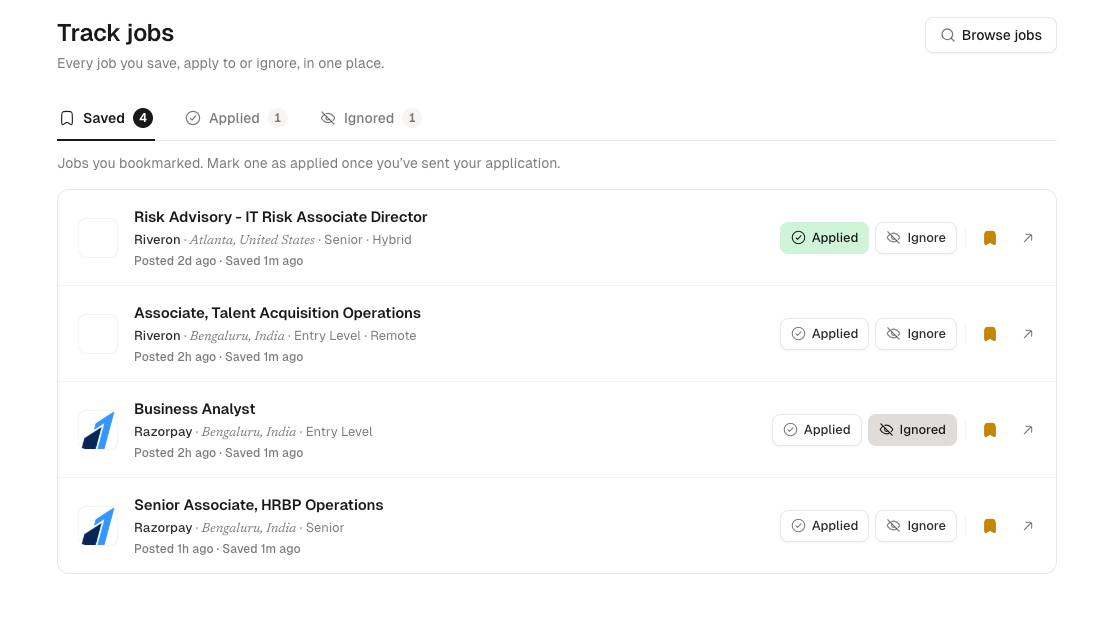
The core function is simple: when you find a role that looks interesting, you save it. When you send your application, you mark it applied. When you decide a role is not right for you, you ignore it. That three-state system is all most job seekers actually need.
More complex trackers add Kanban boards, interview stages, contact notes, and analytics. Those features are useful if you are managing 50 simultaneous applications across a six-month search. For most candidates running an active but focused search of 10 to 30 applications, the simpler the tracker, the more consistently you will use it.
Why Spreadsheets Break Down
Spreadsheets are the default fallback for most job seekers. They work for the first ten applications and then fall apart. Here is why:
- You forget to update it. Switching to a separate tab to log an application is one extra step. One extra step is enough to create a gap. After two weeks, the spreadsheet has fifteen rows and you have sent thirty applications.
- It is hard to scan. A grid of company names, URLs, dates, and status columns requires reading, not glancing. You cannot see the state of your search in ten seconds.
- It does not live where you search. You find a role, bookmark it, tell yourself you will log it later. You do not.
- It breaks under volume. Once you are tracking 30 or 40 applications across multiple cities and functions, the manual upkeep collapses.
The Three States That Actually Matter
Most job trackers overcomplicate the pipeline. They give you columns for "applied," "phone screen," "technical round," "HR round," "offer," and "rejected," and expect you to maintain this religiously across dozens of applications. In practice, candidates update the status for the first few applications and then stop.
The three states that matter are:
Saved. You found a role that looks interesting and you want to come back to it. You have not applied yet. This is your shortlist.
Applied. You sent your resume. The ball is in their court. You know you need to follow up if you hear nothing in 7 to 10 days.
Ignored. You looked at the role properly and decided it is not for you, or you applied and received a rejection. Either way, it is off your radar and you are not wasting mental energy on it.
This is the model HuntYourTribe's job tracker uses. Every job you interact with falls into one of these three states. The view is clean, fast to update, and actually reflects how job search decisions work.
How to Use a Job Application Tracker Effectively
The tracker is only useful if the workflow is consistent. Here is a simple system that works for an active job search.
Step 1: Save first, apply later. When you are browsing jobs, resist the urge to apply immediately to everything that looks interesting. Save the roles that catch your attention. At the end of each session, go through your saved list and decide which ones to actually apply to. This creates a filter between "looks interesting" and "worth my time to tailor a resume."
Step 2: Move to applied the moment you submit. The second you click submit on an application, mark it applied in your tracker. Do not batch-update at the end of the week. The real-time habit is what keeps the data accurate.
Step 3: Use ignored actively. Ignoring a role is a decision, not a failure. If you saved a role and on reflection it is not right, mark it ignored and move on. This keeps your saved list clean and makes sure you are only tracking roles that are genuinely in play.
Step 4: Review your applied list every Monday. Every week, look at your applied list and check whether any applications are more than 10 days old without a response. Those are candidates for a follow-up email. One follow-up, polite and short, can make a real difference at smaller companies.
What Makes HuntYourTribe's Tracker Different
Most job trackers are designed around job boards like LinkedIn, Indeed, and Glassdoor. The Chrome extensions, the autofill tools, and the job matching features are all optimised for how hiring works in the generic job boards.
If you are a software engineer in Bangalore, a product manager in Chennai, or a fresher in Hyderabad looking at startup roles, most of that is irrelevant to your search.
HuntYourTribe's tracker is built differently.
It is part of a job search engine, not a standalone tool. When you find a role on HuntYourTribe, you can save it to your tracker in one click. The job is already there. You do not need to copy URLs, fill in company names, or maintain a separate tab. The search and the tracker are the same product.
It indexes roles directly from company career pages. Most Indian job boards list roles that are days old by the time you see them, because they are aggregating from aggregators. HuntYourTribe pulls directly from startup and SMB career pages across Bangalore, Chennai, Hyderabad, Mumbai, Pune, and Delhi NCR. The roles in your tracker are roles that are actually open.
It comes with job alerts. Once you set your search filters, HuntYourTribe sends you new matching roles automatically. Your saved list grows without you having to manually search every day. This is particularly useful for freshers who are applying to multiple cities or multiple functions at once.
It is lightweight by design. There is no onboarding flow, no Kanban board to configure, no settings to adjust. You save a job, you apply, you track it. That is it. The simplicity is the feature.
Job Application Tracker for Job Seekers in India
Whether you are a fresher applying to your first roles or an experienced professional switching jobs, the problem is the same: once your search crosses 15 to 20 applications, keeping track of where you stand with each company becomes a job in itself.
Most job seekers in India apply across multiple cities, multiple functions, or both. Without a tracker, you lose track of which companies you have already approached, miss follow-up windows, and occasionally apply to the same role twice.
At Indian startups, timing also matters. Hiring managers at smaller companies review applications in batches and close roles faster than large companies do. Being among the first 10 to 20 applicants makes a real difference. A tracker with built-in job alerts means you see new roles within hours of posting and can act before the volume of applicants builds.
HuntYourTribe's tracker is free for all users. The paid plan adds access to roles posted within the last 24 hours and a larger company watchlist, which is worth considering if you are in an active search and want to be first in line at your target companies.
Frequently Asked Questions
Is there a free job application tracker for Indian job seekers? Yes. HuntYourTribe offers a free job tracker that is built into its job search platform. You can save roles, mark applications, and track your search without paying anything. It covers startups and SMBs across Bangalore, Chennai, Hyderabad, Mumbai, Pune, and Delhi NCR.
How do I track job applications in India? The simplest system is three states: saved (roles you are interested in), applied (applications you have sent), and ignored (roles you have ruled out). Use a tracker that is integrated with your job search so saving a role takes one click, not five. Review your applied list every week and follow up on applications older than 10 days.
What is the best job tracker for freshers? For freshers in India, the best tracker is one that is connected to a live job search engine and sends alerts for new roles. Standalone trackers require you to find the jobs first and then log them separately. HuntYourTribe combines job discovery, alerts, and tracking in one place, which means less switching between tools during an already busy search.
Should I use a spreadsheet or a dedicated tracker? Spreadsheets work for very short, focused searches. They break down once you are applying to more than 15 to 20 roles, because the manual update habit does not stick. A dedicated tracker that is integrated with your job search is more reliable because saving a job and tracking it happen in the same place.
How many jobs should I be tracking at once? For experienced candidates, 10 to 20 active applications at any time is a manageable number. For freshers, that number can go higher, 20 to 40, because response rates are lower and the search takes longer. The tracker helps you manage that volume without losing track of where you stand with each company.
Does HuntYourTribe's tracker work on mobile? Yes. HuntYourTribe is accessible on mobile browsers. You can save roles, update application status, and browse jobs from your phone without needing to install an app.
HuntYourTribe indexes job listings directly from startup and SMB career pages across India. The job tracker, job search engine, job alerts, and portfolio builder are available at huntyourtribe.com.